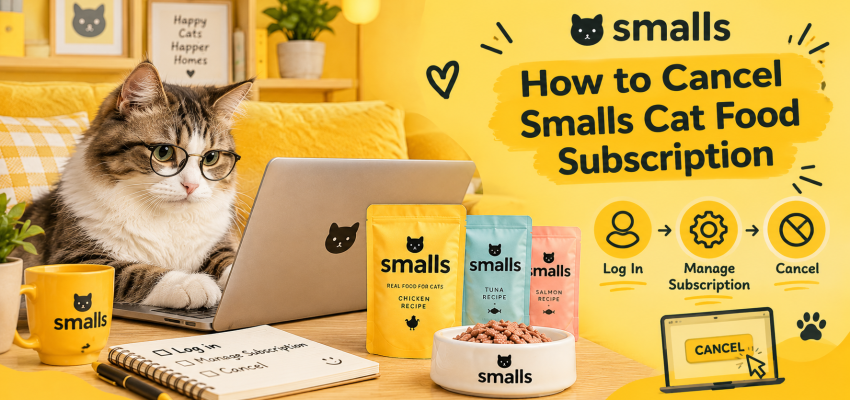

Need a break from Smalls, or simply want to stop your regular cat food deliveries? Don’t worry — cancelling your Smalls Cat Food subscription is manageable once you know where to go and what to check.
You can request cancellation through Smalls’ customer support by text or email. Before you start, check your next billing date so you have enough time to complete the process and avoid another charge.
In this guide, we’ll walk you through how to cancel your Smalls Cat Food subscription, what to do if you can’t access your account, how to skip a delivery instead, and what to know about refunds and future payments.
How to Cancel Smalls Cat Food Subscription
The simplest approach is to manage your subscription through your Smalls account if the cancellation option is available. If you can’t find it or run into a problem, you can contact the customer support team directly.
Method 1: Cancel Your Subscription Online
Follow these steps to get started:
Step 1: Visit the Smalls website
Go to the official Smalls website and sign in using the email address associated with your subscription.
Step 2: Open your account
Once you’re logged in, look for your profile, account details, or subscription-management section. The exact menu names may change as the website is updated.
Step 3: Find your active subscription
Review your current plan and look for an option to cancel your subscription. Make sure you’re managing the recurring plan rather than simply changing your food selection or delivery date.
Step 4: Follow the cancellation instructions
Select the cancellation option if available, then complete any confirmation steps shown on the screen.
Step 5: Check for confirmation
Look for a confirmation email or an update to your account. If your subscription still appears active or you aren’t sure whether the cancellation went through, contact customer support.
Helpful tip: Don’t leave cancellation until the last minute. Give yourself time to resolve any account or website issues before your next scheduled payment.
Method 2: Cancel Smalls Cat Food Subscription by Text
If you prefer texting, Smalls lists this number for its Cat Concierge support team:
503-487-4303
Send a short message explaining that you’d like to cancel your subscription. Include the email address linked to your account so the team can identify your plan.
You can use this message as a starting point:
“Hi! I’d like to cancel my Smalls Cat Food subscription and stop future recurring orders. The email address associated with my account is [your email address]. Please confirm when the cancellation is complete and let me know if any upcoming order has already been processed. Thank you!”
Keep a copy of the message and the response. Sending a request is not necessarily the same as receiving confirmation that your subscription has been cancelled.
Method 3: Cancel Your Smalls Subscription by Email
Would you rather keep everything in writing? Email is another option.
Smalls lists this customer support email address:
meow@smalls.com
Use a clear subject line, such as “Request to Cancel Smalls Cat Food Subscription.”
In your email, include:
- The email address associated with your Smalls account.
- A clear request to cancel your subscription.
- A request to stop future recurring orders.
- A question about any upcoming payment or shipment.
Ask the team to confirm the cancellation in writing. Save its reply in case you need to check your subscription status later.
When Should You Cancel to Avoid Another Charge?
Timing is important when cancelling any recurring subscription.
Smalls’ published terms state that you must cancel at least 24 hours before your next scheduled charge date. The company also explains that orders are processed on Fridays, so you should check your own account and current terms rather than relying on a general schedule.
To help avoid another charge:
- Check your next scheduled payment date.
- Submit your cancellation request as early as possible.
- Complete any required confirmation steps.
- Save the cancellation confirmation.
- Contact support if your account still shows an active subscription.
If your next order is already being processed, cancelling your subscription may not stop that particular shipment. Ask customer support about the status of the order if you’re unsure.
What Is the Smalls Cat Food Cancellation Policy?
Before cancelling, it’s worth understanding the difference between stopping future deliveries and cancelling an order that’s already being prepared.
Smalls’ published terms allow customers to cancel their subscriptions, subject to the deadline before the next charge. The company also states that subscription fees paid for a period before cancellation is confirmed are not eligible for a prorated refund.
In practical terms, remember these points:
- Cancel before the deadline for your next charge.
- Check whether your upcoming order has already been processed.
- Keep written confirmation of your cancellation.
- Don’t assume that cancelling automatically refunds a previous payment.
- Review the current terms if you have questions about your particular order.
Policies can change, so confirm the latest details before making your decision.
Can You Cancel Smalls After You’ve Been Charged?
Yes, you can still request cancellation of future subscription orders. However, whether you can stop or receive a refund for the current order depends on its status and the applicable policy.
If a payment has already been taken, don’t panic. Start by checking your account to see whether the order has been processed.
Then contact customer support and ask:
- What does the charge relate to?
- Has the order already been processed?
- Is there any option to cancel or change the current order?
- Has the recurring subscription been cancelled for future orders?
Keep the conversation in writing where possible. If you believe a charge is incorrect and the issue cannot be resolved, you can also ask your payment provider about its dispute process.
Can You Skip a Smalls Delivery Instead of Cancelling?
Not everyone wants to leave Smalls permanently. Sometimes you simply have too much food at home or need to delay your next delivery.
If that’s your situation, skipping or rescheduling an order may be a better fit than cancelling the entire subscription.
Here’s how to check your options:
- Sign in to your Smalls Cat food account.
- Open the Manage Subscription section.
- Look for the option to skip or reschedule your next order.
- Follow the instructions and check that the change has been saved.
Keep in mind that skipping a delivery is different from cancelling your subscription. Your plan may remain active and future orders may still be scheduled.
If you can’t make the change online, contact customer support for help.
What If You Can’t Log In to Your Smalls Account?
Forgotten passwords and account-access problems can make cancellation frustrating, but you still have options.
First, try the login or account-recovery feature on the Smalls website. Use the email address you originally used when signing up, and check your spam folder if you don’t receive the login email.
If you still can’t get into your account:
- Email meow@smalls.com.
- Or text 503-487-4303.
- Explain that you cannot access your account and want to cancel.
- Provide the email address linked to the subscription.
- Ask for written confirmation once the cancellation is complete.
For your security, don’t send your password or full payment-card details by email or text.
What If Smalls Keeps Charging You After Cancellation?
Seeing another charge after requesting cancellation can be worrying. Before assuming something has gone wrong, check the cancellation date and the status of your most recent order.
Sometimes, a payment relates to an order that was already processed before the cancellation took effect. In other cases, the request may not have been completed.
Here’s what you can do.
1. Find Your Cancellation Confirmation
Look for the confirmation email or support message. Check the date and any information about when the cancellation became effective.
2. Check Your Account
If you can log in, review your subscription status and upcoming orders. Save a screenshot if the account still appears active.
3. Contact Customer Support
Email or text Smalls with the date you requested cancellation, the date of the charge, and your confirmation details. Ask the team to investigate and confirm that future recurring orders have stopped.
4. Contact Your Payment Provider if Needed
If you believe the charge is incorrect and cannot resolve the issue directly, ask your bank or card provider about its dispute process.
Keep your records together so you can explain what happened clearly.
Will You Get a Refund After Cancelling Smalls?
Cancelling a subscription doesn’t automatically mean you’ll receive a refund.
Smalls’ standard policy says that processed orders generally cannot be cancelled or refunded. However, certain sampler purchases may qualify under a separate money-back guarantee, subject to its conditions.
If you’re hoping for a refund, here’s what to do:
- Identify the order or payment you’re asking about.
- Check the current refund policy.
- Contact Smalls customer support.
- Explain why you’re requesting a refund.
- Ask whether your order qualifies under any applicable guarantee.
Be clear about whether you’re cancelling future deliveries, requesting a refund for an existing order, or asking about both. These are separate requests and may be handled differently.
What Should You Do With Leftover Smalls Cat Food?
If you’re cancelling because your cat no longer enjoys the food or you’ve ordered more than you need, you may be wondering what to do with the remaining packs.
Start by checking the packaging for storage, refrigeration, freezing, and handling instructions. Don’t feed food that may have been stored incorrectly or is no longer safe.
Smalls does not generally accept food returns. If you have unused food that you can’t use, consider donating it to a local animal shelter if the shelter accepts it and the food is safe and suitable to donate.
If you’re changing your cat’s diet, consider a gradual transition when appropriate. If your cat has a medical condition or is persistently refusing food, ask your veterinarian for advice.
Smalls Cat Food Subscription Cancellation Checklist
Before you finish, run through this quick checklist:
- Check your next billing date.
- Review the cancellation deadline.
- Submit your cancellation request.
- Complete any required confirmation steps.
- Save the confirmation email or support message.
- Check the status of your upcoming order.
- Review any payment made around the cancellation date.
- Confirm that future recurring orders have stopped.
Taking a few minutes to check these details can save you time and help you avoid confusion later.
Frequently Asked Questions
How do I cancel Smalls Cat Food subscription quickly?
Sign in to your Smalls account and look for the subscription cancellation option. If you can’t complete the process online, contact support by texting 503-487-4303 or emailing meow@smalls.com. Ask for written confirmation.
What is the Smalls customer service phone number?
Smalls lists 503-487-4303 as its Cat Concierge text number. You can also email meow@smalls.com. Check the official website for the latest contact information.
Can I cancel my Smalls subscription at any time?
Smalls’ published terms allow cancellation, provided you meet the deadline before the next scheduled charge. Check your account and the current terms to confirm the timing that applies to you.
Can I cancel Smalls after a payment has been taken?
You can request cancellation of future orders, but a payment already taken may relate to an order that has been processed. Contact support to check the order status and whether any options are available.
Will I receive a refund after cancelling Smalls?
Not automatically. Processed orders generally aren’t eligible for cancellation or refunds under the standard policy, although certain sampler orders may qualify for a separate money-back guarantee.
Can I skip a Smalls order without cancelling my subscription?
Yes, Smalls provides an option to skip or reschedule an upcoming order through the Manage Subscription section. Your Smalls cat food subscription cost may remain active, so check the status of future deliveries.
What if I can’t find the cancellation option?
Contact customer support by text or email. Explain that you can’t find the cancellation option and ask the team to cancel the subscription and confirm when the change takes effect.
What if Smalls charges me after I cancelled?
Check your confirmation and order status first. Then contact Smalls with the relevant dates and payment details. If the issue remains unresolved, ask your payment provider about its dispute process.
Final Thoughts
Cancelling your Smalls Cat Food subscription doesn’t have to be complicated. Start by checking your next billing date, submit your cancellation request through the available account option or customer support, and make sure you receive confirmation.
If you only need a little extra time before your next delivery, consider skipping or rescheduling an order instead. And if you’ve already been charged, check the order status before assuming a refund is available.
Most importantly, keep a record of your request and confirm that future recurring orders have stopped. That way, you can move on with confidence and focus on finding the feeding routine that works best for you and your cat.